
The new Windows Azure SDK 1.3 supports Full IIS, allowing your web roles to access the full range of web server features available in an on-premise IIS installation. However if you choose to deploy your applications to Full IIS, there are a few subtle differences in behaviour from the Hosted Web Core model which you will need to understand.
What is Full IIS?
Windows Azure's Web Role has always allowed you to deploy web sites and services. However many people may not have realised that the Web Role did not actually run the full Internet Information Services (IIS). Instead, it used a component called Hosted Web Core (HWC), which as its name suggests is the core engine for serving up web pages that can be hosted in a different process. For most simple scenarios it doesn't really matter if you're running in HWC or IIS. However there are a number of useful capabilities that only exist in IIS, including support for multiple sites or virtual applications and activation of WCF services over non-HTTP transports through Windows Activation Services.
One of the many announcements we made at PDC 2010 is that Windows Azure Web Roles will support Full IIS. This functionality is now publicly available and included in Windows Azure SDK v1.3. To tell the Windows Azure SDK that you want to run under Full IIS rather than HWC, all you need to do is add a valid
A simple section defining a single website looks like this:
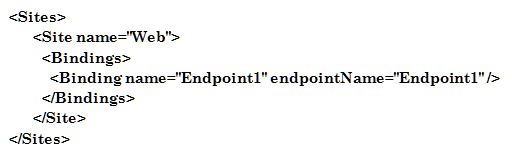
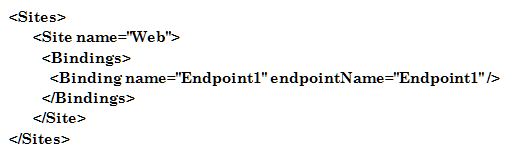
You can easily customise this section to define multiple web sites, virtual applications or virtual directories, as shown in this example:

After working with early adopter customers with Full IIS for the last couple of months, I've found that it's now easier than ever to port existing web applications to Windows Azure. However I've also found a few areas where you'll need to do things a bit differently to you did with HWC due to the different hosting model.
New Hosting Model
There is a significant difference in how your code is hosted in Windows Azure depending on whether you use HWC or Full IIS. Under HWC, both the RoleEntryPoint methods (e.g. the OnStart method of your WebRole class which derives from RoleEntryPoint) and the web site itself run under the WaWebHost.exe process. However with full IIS, the RoleEntryPoint runs under WaIISHost.exe, while the web site runs under a normal IIS w3wp.exe process. This can be somewhat unexpected, as all of your code belongs to the same Visual Studio project and compiles into the same DLL. The following diagram shows how a web project compiled into a binary called WebRole1.dll is hosted in Windows Azure under HWC and IIS.

This difference can have some unexpected implications, as described in the following sections.
Reading config files from RoleEntryPoint and your web site
Even though the preferred way of storing configuration in Windows Azure applications is in the ServiceConfiguration.cscfg file, there are still many cases when you may want to use a normal .NET config file - especially when configuring .NET system components or reusable frameworks. In particular whenever you use Windows Azure diagnostics you need to configure the DiagnosticMonitorTraceListener in a .NET config file.
When you create your web role project, Visual Studio creates a web.config file for your .NET configuration. While your web application can access this information, your RoleEntryPoint code cannot-because it's not running as a part of your web site. As mentioned earlier, it runs under a process called WaIISHost.exe, so it expects its configuration to be in a file called WaIISHost.exe.config. Therefore, if you create a file with this name in the your web project and set the "Copy to Output Directory" property to "Copy Always" you'll find that the RoleEntryPoint can read this happily. This is one of the only cases I can think of where you'll have two .NET configuration files in the same project!
Accessing Static Members from RoleEntryPoint and your web site
Another implication of this change is that any AppDomain-scoped data such as static variables will no longer be shared between your RoleEntryPoint and your web application. This could impact your application in a number of ways, but there is one scenario which is likely to come up a lot if you're migrating existing Windows Azure applications to use Full IIS. If you've used the CloudStorageAccount class before you've probably used code like this to initialise an instance from a stored connection string:
var storageAccount = CloudStorageAccount.FromConfigurationSetting("ConnectionString");

